Connect WPForms to Google Sheets Automatically
Automatically sync WPForms submissions to Google Sheets without manual copy-paste. Organize leads, registrations, surveys, and contact form entries in real time.
Works with WPForms Lite and WPForms Pro
WPForms
Google Sheets
| # | Name | Status | |
|---|---|---|---|
| 1 | John Doe | john@example.com | New |
| 2 | Sarah Ali | sarah@mail.com | New |
| 3 | Mike Chen | mike@co.org | Contacted |
| 4 | Emma R. | emma@biz.io | New |
Stop Copying Form Data by Hand
Managing form submissions manually is slow and frustrating. Exporting entries, copying data into spreadsheets, and organizing submissions by hand wastes time and increases the chance of errors.
Google Sheets Connector for WPForms solves this by automatically sending WPForms entries to Google Sheets. Every new submission is added to your spreadsheet instantly, helping you keep your data organized, accessible, and ready for reporting.
Up and Running in Minutes
Set up your Google Sheets workflow in just a few simple steps.
Connect Your Google Account
Connect your Google account securely from the WPForms Integrations page.
Create a Spreadsheet Connection
Choose an existing spreadsheet or create a new one directly from the builder.
Map Form Fields to Columns
Match WPForms fields with Google Sheets columns using the built-in field mapping tools.
Auto-Send Submissions
Every new form submission is inserted into your selected sheet automatically.
Powerful Features Built for Real Workflows
Everything you need to connect WPForms with Google Sheets in a smarter and more flexible way.
Standard Google Connect
Connect with Google quickly using the built-in standard authentication flow.
Advanced OAuth Mode
Use your own Google Cloud project, Client ID, and Client Secret for full control.
Existing or New Spreadsheet
Select an existing spreadsheet or create a new one directly from the form builder.
Existing or New Sheet
Send entries to an existing sheet or automatically create a new sheet tab.
Field Mapping
Map form fields to spreadsheet columns in a flexible and organized way.
Conditional Logic
Send entries only when your custom rules match or skip entries when needed.
Smart Tags & Custom Values
Insert dynamic values, Smart Tags, and custom content into spreadsheet rows.
Multiple Connections
Connect one form to multiple spreadsheets or use different forms with different sheets.
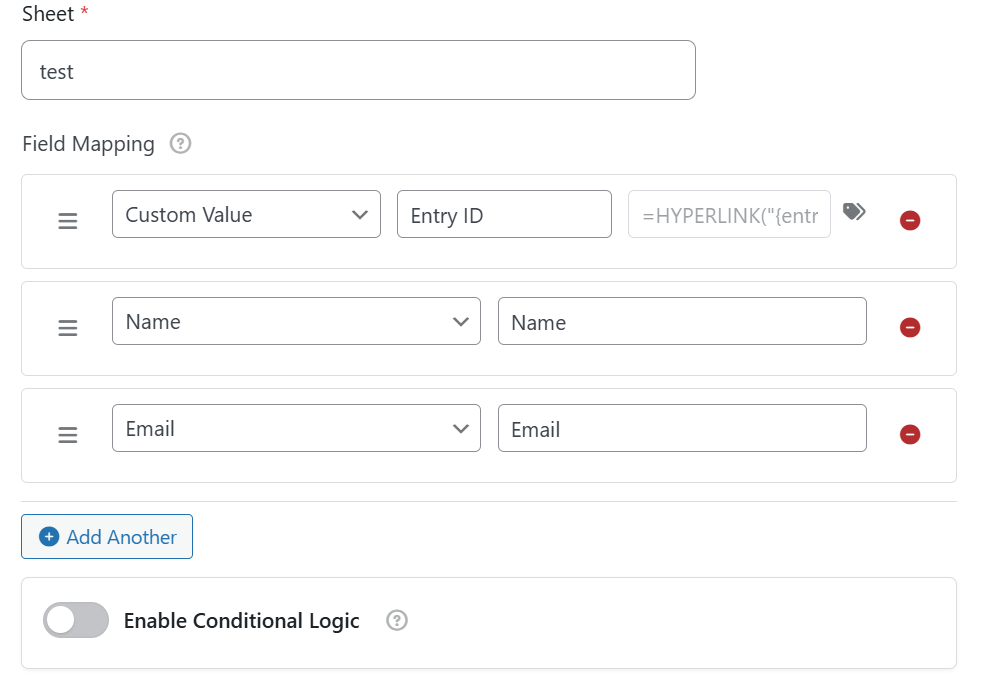
Smart Mapping and Automated Data Flow
Map WPForms fields to Google Sheets columns with a clean workflow. Use custom headers, Smart Tags, and custom values to organize your spreadsheet exactly the way you want. Every new submission is then sent to the selected sheet automatically.
Send Only the Data You Want
Use conditional logic to control exactly when a form entry should be sent to Google Sheets. Create rules based on field values and decide whether entries should be processed only when conditions match — or skipped when they match.
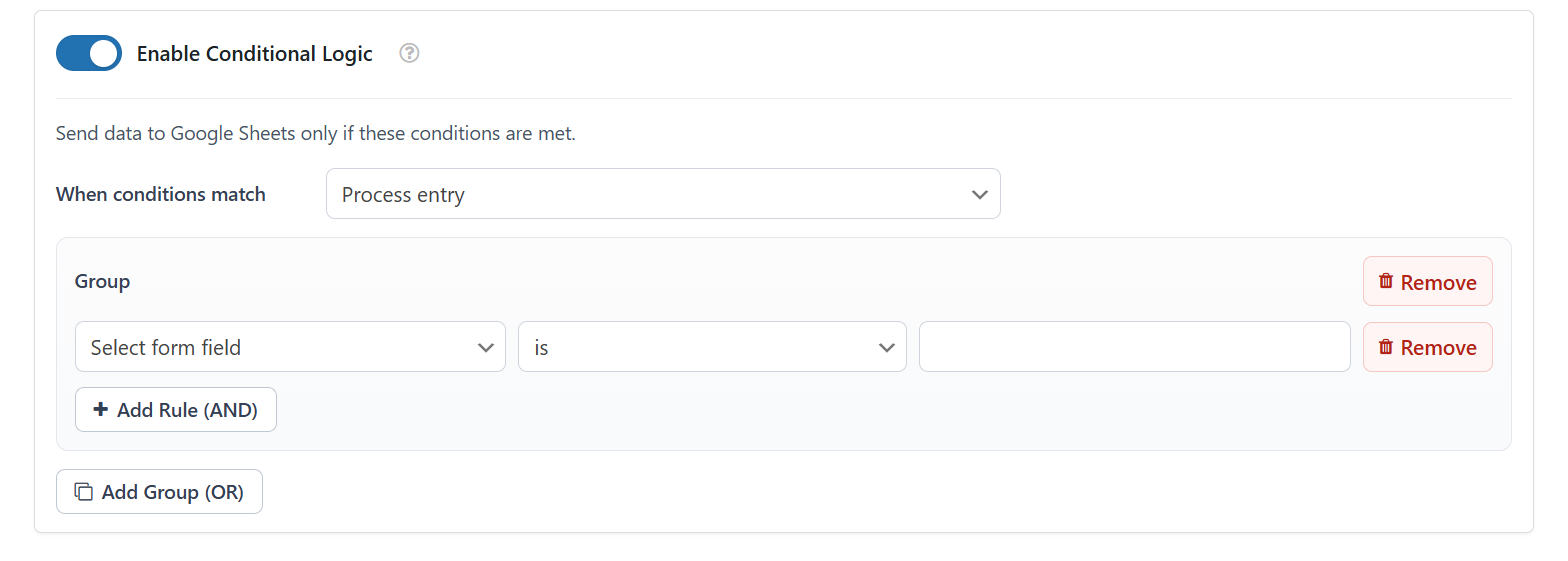
Rule groups, operators, and process entry controls.
Simple, Transparent Pricing
One-time payment, lifetime access and updates.
Single Site License
Perfect for personal projects and individual websites.
- Use on 1 Website
- Lifetime Updates
- Unlimited Form Syncs
- All Premium Features
- Premium Support
Secure payment via Envato Market. 30-day money-back guarantee.
Frequently Asked Questions
Start Syncing WPForms with
Google Sheets Today
Save time, reduce manual work, and keep your form submissions organized automatically.